
Free download · No signup · 81 KB .xlsx
Rent vs Buy Excel Calculator Spreadsheet
for India
The rent-or-buy comparison as an editable spreadsheet you can keep, tweak, and share. Enter your loan and rent numbers, and the final verdict is highlighted for you.
Download the Excel calculator Works in Excel, Google Sheets & LibreOffice
Latest update (v1.2): the expected return is now compounded yearly, so typing 9 means 9% a year rather than 9.38%. Version 1.1 added the Yes/No option to keep investing the freed-up EMI budget after the loan ends.
One financial decision, two paths to wealth
Calculate the numbers behind the biggest housing/financial decision most Indians face. This calculator compares your housing loan against renting a similar home over any period you choose: shorter than the loan, the same, or even 20 years longer.
The base assumption: both paths start with the same money. The down payment used to buy is instead invested when renting, and the monthly difference between EMI and rent becomes a SIP. If the comparison period runs past the loan tenure period, the owner's freed-up EMI is invested too; so the spreadsheet fairly compares two growing portfolios: property plus investments on one side, pure investments on the other.
The choice between renting and buying typically impacts 20-30% of your lifetime wealth. A ₹50 lakh purchase decision made today can swing your outcome by ₹15-25 lakhs over 20 years. Most people decide on emotion or social pressure; this spreadsheet strips away the emotion and presents you with the pure financial maths.
Before you start: 9 inputs to gather
Property & loan details
- Purchase price (₹): Total property cost you're considering, including registration, commissions, and closing fees
- Down payment (%): Percentage you'll pay upfront (typically 20-25%)
- Loan interest rate (% p.a.): Current home loan rates (check with 2-3 banks)
- Loan tenure (years): Repayment period (15-30 years typical)
Rental & investment assumptions
- Monthly rent (₹): Cost to rent a similar property today. Do your research.
- Annual rent increase (%): How much rent rises yearly (3-7% typical) over the full comparison period
- Property appreciation (% p.a.): Property value growth rate; check typical rates for the area
- Investment return rate (% p.a.): Returns you expect from mutual funds or other investments
- Comparison period (years): How long you plan to stay (10-30 years, typically)
How to use the spreadsheet calculator
- Open the file in Microsoft Excel, Google Sheets, or LibreOffice Calc.
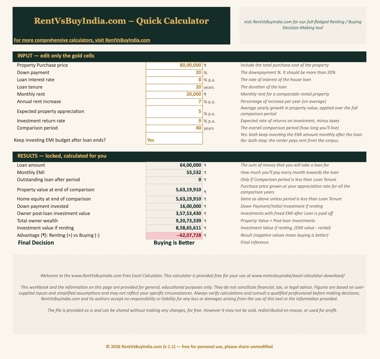
- The gold-bordered cells are editable: enter your rent, home price, loan rate, tenure, expected appreciation, and investment return assumptions. Everything else is locked so the formulas can't be changed by accident.
- Review the summary dashboard, the annual cash-flow table on the next sheet, and the final verdict highlighted in green at the bottom of the table.
- Tweak assumptions any time to test best-case, worst-case, and realistic scenarios.
How to read your calculation results
The calculator shows the final advantage in rupees; positive means renting wins, negative means buying wins:
- Difference under ₹5 lakhs: the outcome is similar, so choose on lifestyle.
- Buying wins by ₹5+ lakhs: a strong financial case for ownership in your scenario.
- Renting wins by ₹5+ lakhs: renting and investing likely builds more wealth.
- Comparison period matters: shorter periods often favour renting; longer periods typically favour buying.
Then stress-test the decision: slower or faster property appreciation, conservative vs aggressive investment returns, rate changes, and how long you actually plan to stay. Remember: this shows pure financial outcomes, so factor in stability, mobility, maintenance responsibilities, and tax implications before deciding.
Ready to run your numbers?
Free, 81 KB, no email; yours in one click.
What this Rent Vs Buy Excel Calculator assumes
- Equal starting capital: you have the same money available whether you rent or buy.
- Investment discipline: when renting, the down payment is invested immediately and the monthly EMI–rent difference consistently.
- No transaction costs: registration, brokerage, and legal costs (typically 2-5% of property value) are excluded, though you can fold them into the buying cost.
- No maintenance or taxes: property tax, society charges and maintenance are not modelled.
- Returns are annual: the expected return is treated as a yearly compound rate, the way fund returns are quoted, so 9% grows your money 9% in a year. The online calculator reads it the same way.
- Perfect market timing: investments can be made and withdrawn exactly when needed.
For calculations that include taxes, maintenance, and inflation adjustments, use our comprehensive online rent vs buy calculator.
Rent Vs Buy Calculation Methodology: how the maths works
1. The ownership path
Monthly EMI uses the standard home-loan formula:
P = loan amount · r = monthly interest rate · n = months
Property appreciation compounds annually:
When the comparison runs past the loan tenure, a toggle lets you choose what happens next: either both parties keep investing the EMI-sized budget monthly (owner invests the freed EMI; renter invests EMI minus rent), or both stop and the renter pays rent from the corpus. Either way the comparison stays fair: both paths always get the same budget.
2. The rental path
The down payment is invested as a lump sum on day one; the EMI–rent difference is invested monthly. Rent escalates annually at your chosen rate, shrinking that monthly surplus over time.
SIP growth = monthly amount × [((1+r)n − 1) ÷ r] × (1+r)
r = monthly return rate · n = months
3. The verdict
After your chosen period the sheet compares owner wealth (property + post-loan investments) against renter wealth (the investment portfolio). These calculations follow standard financial principles used by investment advisors across India, and you can verify any component, like the EMI, against our own EMI calculator.
Frequently asked questions
Is this Rent Vs Buy Excel calculator really a free download?
Yes, completely free with no email required. We believe everyone should run the numbers before making a multi-crore property decision. Download the Excel file, share it, and return anytime for updates. For analysis that includes taxes, maintenance costs and inflation adjustments, use our online rent vs buy calculator.
What if buying wins by only ₹2-3 lakhs over 20 years?
When the financial difference is small (under ₹5 lakhs), your decision should factor in non-financial considerations like job mobility, family stability, and maintenance responsibilities. The Excel calculator shows pure financial outcomes; you decide if the difference justifies the choice.
Will this Excel Calculator for renting vs buying work in Google Sheets?
Yes. Upload the .xlsx file to Google Drive and open the spreadsheet with Google Sheets. All formulas and calculations work perfectly, though formatting may appear slightly different.
Should I trust the property appreciation and investment return assumptions?
You should use the assumptions that you typically use for your own personal projections. The default values that we use (5% property appreciation, 10% investment returns) are reasonable long-term averages, but you should also test out different scenarios. Try conservative assumptions (3% and 8%) and optimistic ones (7% and 12%) to see how sensitive your decision is to these variables. Past performance does not guarantee future results, so model multiple scenarios before deciding.
What about taxes, maintenance, and registration costs?
This Excel tool focuses on core financial principles and excludes transaction costs (typically 2-5% of property value), maintenance, property taxes, and tax benefits. For calculations that include these factors, use our comprehensive web-based rent vs buy calculator for India.
How often is the excel calculator updated?
We review and update this and other calculators on our website periodically. If any calculation errors are found, we fix them immediately. This page always hosts the latest version; the version number is in the footer of the Input sheet. We have already made some revisions.
Can I share or modify the Excel calculator file?
You may freely share the file unchanged. However, you may not modify, sell, or redistribute it commercially. The calculator design and methodology are property of RentVsBuyIndia.com and are provided as-is for educational purposes.
Disclaimer: This Excel spreadsheet and the information on this page are provided for general, educational purposes only. They do not constitute financial, tax, or legal advice. Figures are based on user-supplied inputs and simplified assumptions and may not reflect your specific circumstances. Always verify calculations and consult a qualified professional before making decisions. RentVsBuyIndia.com and its authors accept no responsibility or liability for any loss or damages arising from the use of this tool or the information provided. See our full disclaimer.